Seating chart
The table plan, drawn in the room it belongs to
A seating chart is not a list. It is a room, with a stage at one end and a bar at the other, and an aunt and uncle who cannot sit together. In Kuvert you draw the room first and fill the chairs afterwards.
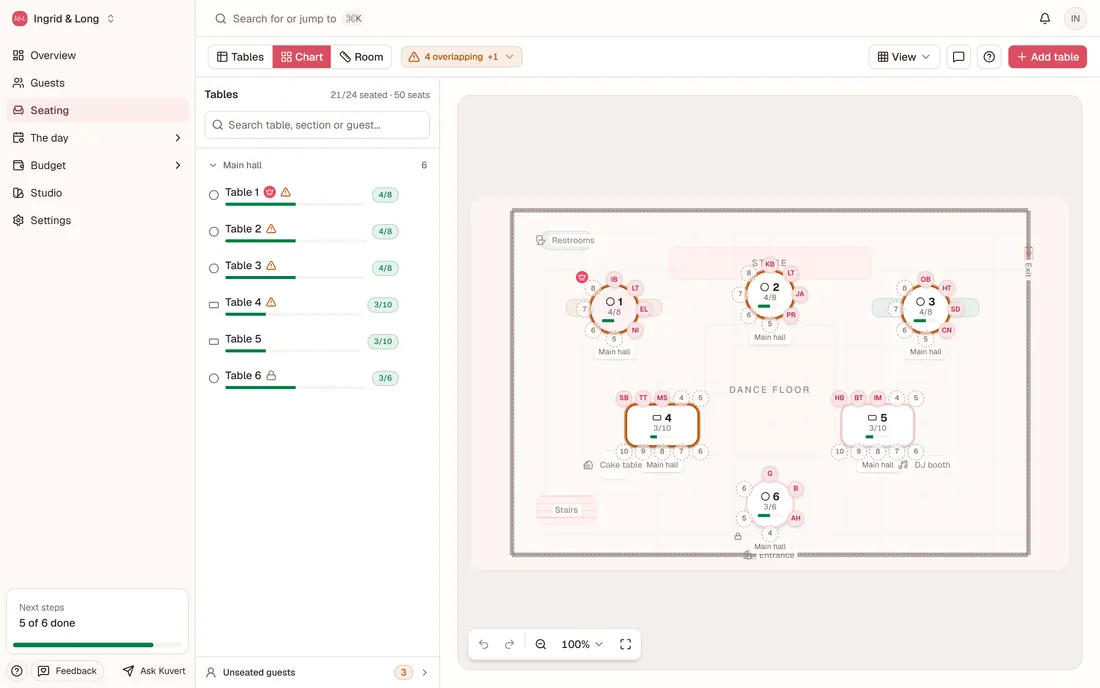
Draw the venue before you seat anybody
Put in round tables, long tables, the stage, the bar, the dance floor and the door, and drag them to where they actually stand. The hall is a floor plan rather than a table — and once the chart looks like the room, you can see for yourself that table nine is behind the speaker.
The chairs count themselves
Every table has a number of seats, and the chart will not let you put eleven guests on ten chairs. Groups move together, guests you have not seated yet stay in a list of their own, and a table you have finished with can be locked so nobody pulls at it by accident.
Guests find their own seat
Once the chart is done you print one sheet: your names and a QR code. Hang it where guests arrive. The guest scans, searches for their name, and gets their table, who else is at it and a map of the room with their table marked. No queue in front of a poster in the hallway — and moving somebody the night before does not make the sheet wrong, because it points at a search rather than at a list.

A guest dragged from the list onto a chair. The table's count updates while the hand is still holding.
Questions and answers
Can we change the seating after the invitations have gone out?
Yes. The seating is not printed anywhere — the sheet you hang up points at a search, not at a list. Move somebody in the morning and the search shows the new table straight away, and the iPad at the venue shows the same.
What about guests who cannot sit together?
Put them in separate groups and seat the groups at separate tables. Kuvert moves a group as one, so you will not drag one of them along by accident while tidying up another table.
Can we print the seating chart?
Yes, and it comes out as two sheets for two different readers. The floor plan prints to scale for the venue, the caterer and the DJ, none of whom work in an app. The QR sheet is the guests'. Print & signs is a third thing again: it is where you keep track of the printed pieces you order elsewhere, from idea to delivered.
Do guests have to use their own phone?
No. Put out an iPad in kiosk mode and it is a shared lookup station: it returns to the search by itself after each guest and clears the field, so nobody is left looking at the previous guest's table. Anyone who would rather use their own phone still can.
Draw your own table plan
Make an account, put the venue in, and watch the tables fall into place. The guest list can be imported from the spreadsheet you already have.